Stream Alerts
✨ Introduced in Frogge v1.0
Stream Alerts posts a "went live" notification to a channel whenever one of your tracked Twitch accounts starts streaming. It's Twitch-only for now, and entirely Discord-only: there's no Dashboard equivalent.
Quick Start
- Run /admin menu → → .
- Pick the channel the notification should post to, then optionally pick a role to @mention.
- Enter the Twitch username to track, from
twitch.tv/<username>.
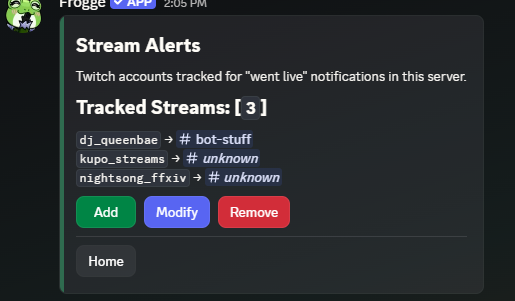
Full reference
Adding a tracked stream
walks through three steps in order: pick a Channel (where the notification posts), pick an optional Role to @mention (or ), then a modal for the Twitch Username. Up to 10 tracked streams per venue.
Notifications
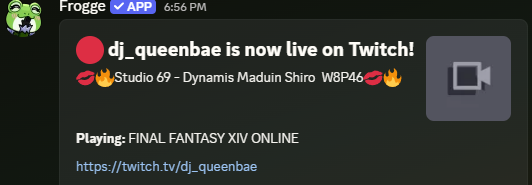
A background sweep checks every tracked streamer roughly every 2 minutes. The moment one goes live, it posts once: a "🔴 {name} is now live on Twitch!" message with the stream's title, thumbnail, and game (if set), plus a link to the channel and the configured role mention, if any. Going offline and coming back live later posts a fresh notification; it only fires on that transition, never repeatedly while someone's still live.
Modifying & removing
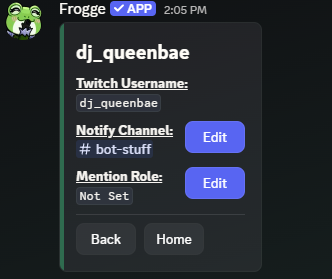
lets you change a tracked stream's Notify Channel or Mention Role (clearable back to none). The Twitch username itself can't be changed: remove the entry and add a new one to track a different account. stops tracking it entirely.
Related
- Standalone: doesn't connect to any other module.
- Requires a Twitch application to be configured on the bot's side before any notification can fire. If that's not set up yet, tracked streams just sit idle until it is.