FFXIVVenues Integration
🐸 Introduced in Frogge v0.7
If your venue is listed on FFXIVVenues, you can link that listing so FroggeBot can post a live status card (open/closed, hiring, tags, notices) that keeps itself current automatically. This is read-only: nothing you do here ever writes back to FFXIVVenues, and it's Discord-only, reached from the unified Settings menu rather than its own admin-menu button.
Quick Start
- Run /admin menu → → → .
- FroggeBot searches FFXIVVenues for a listing you manage. If it finds exactly one, confirm it; if it finds several, pick one; if it finds none, use Enter ID instead (paste the venue ID from your listing's URL).
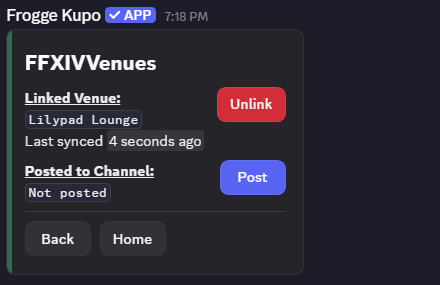
- and pick a channel: the status card stays up to date on its own from then on.
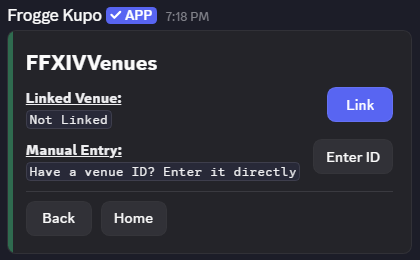 →
→ 
Full reference
Linking
Linking replaces any venue currently linked (you're asked to confirm). Two ways to find your listing:
- Link: searches FFXIVVenues for listings where your Discord account is a manager.
- Enter ID: paste a venue ID directly (found in your listing's own URL), the fallback for when the actual FFXIVVenues manager isn't the person setting this up in Discord.
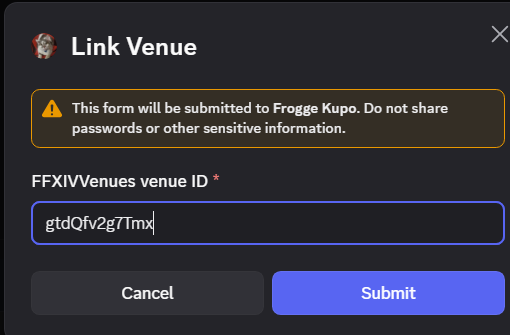
The Settings screen shows the linked venue's name and when it last synced, with .
The posted status card
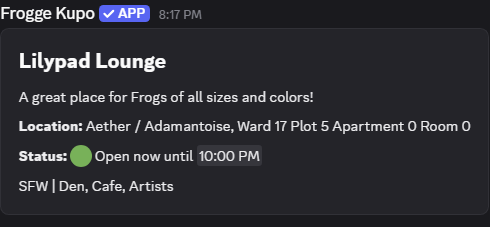
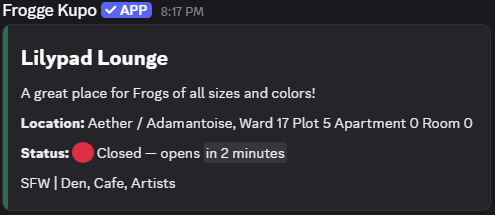
(or Repost, once already posted) picks a channel and posts a card showing the venue's name, description, and banner image; its location; whether it's Open now or Closed (with when that changes next); Hiring status; SFW/NSFW; tags; any active notices; and Discord/website links. If the venue isn't yet approved on FFXIVVenues, the card shows a warning that it won't appear in FFXIVVenues' own directory yet.
The card refreshes itself automatically: a background sweep re-syncs from FFXIVVenues roughly every 15 minutes, so you don't need to repost it after your listing changes.
Unlinking
Unlinking doesn't delete the posted card or leave it frozen showing stale data. It edits the message to an explicit "this venue is no longer linked" notice.
Related
- Standalone: doesn't connect to any other module.