Raffles
🐸 Introduced in Frogge v0.3
Raffles are a ticket-based prize draw, distinct from Giveaways in a few real ways: tickets are credited by an admin (not a self-service entry button), the draw is weighted by ticket count rather than one-entry-one-chance, and there's a real gil pot with a winner/venue split. There's no end date. Rolling is always a manual admin action.
Quick Start
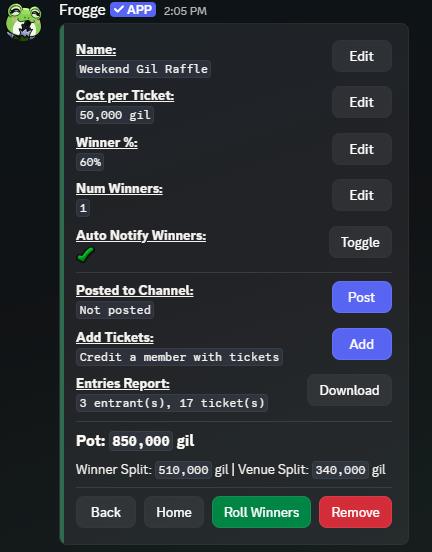
- Run /admin menu → → . Set its Name, Cost per Ticket, Winner %, and Num Winners from the detail screen.
- Credit tickets as people buy them: next to Add
Tickets → pick the member → enter a quantity. (Or use
/addtickets, see below.) - when ready.
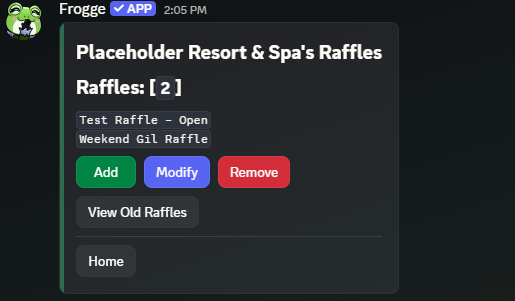 →
→ 
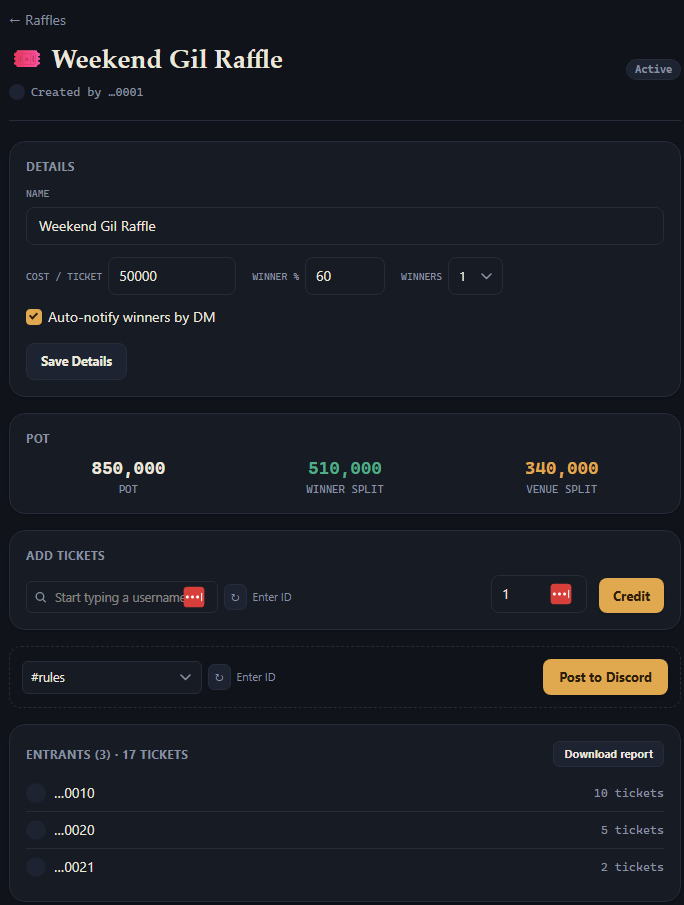
- Open Raffles → + New Raffle, then fill in its Details on the raffle's own page.
- Credit tickets with the Add Tickets form (search for a member, enter a quantity).
- Roll Winners when ready.
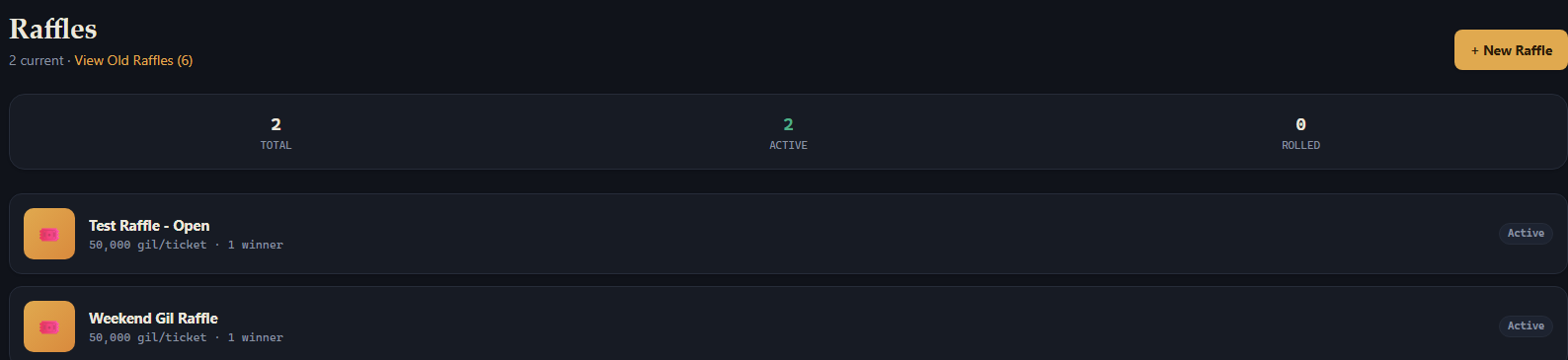 →
→ 
Full reference
Creating & editing
A raffle's detail screen covers Name, Cost per Ticket (in gil, type k/m shorthand
like 100k, capped at 999,999,999), Winner % (the winners' share of the pot, 0–100), Num
Winners (1–10), and Auto Notify Winners (DM each winner when rolled). Unlike Giveaways,
there's no visual customization (no description/thumbnail/color/emoji). Raffles are
function-first.
Crediting tickets
Three equivalent ways to credit tickets, all landing in the same place:
- The detail screen's button, next to Add Tickets (Discord) or the Add Tickets form (Dashboard): pick a member, enter a quantity.
- /addtickets: a typed command (autocomplete over raffles that haven't been rolled yet, then a member and a quantity), kept alongside the picker flow specifically so crediting doesn't slow down during busy club hours.

Tickets can't be added once a raffle's been rolled.
The pot
The detail screen shows the live pot: total tickets sold × cost per ticket, split by Winner % into a winner share and a venue share. Both surfaces show the same numbers.
Posting & the entries report
Unlike Events/Giveaways/Profiles, raffle posting works from either surface: the posted tracker is a plain read-only info card (cost per ticket, entrant/ticket counts, the pot split, and winners once rolled) with no entry button of its own, so there's no interactive state only Discord can own. picks a channel; the Dashboard additionally has its own Refresh and Remove for an existing post, not just Discord's automatic keep-up-to-date.
Entries Report (either surface) downloads a .txt file of every entrant and their ticket
count, sorted highest first.
Rolling winners
(re-labeled Re-Roll Winners after the first roll, with a confirmation before picking again) is available on both surfaces. The draw is ticket-weighted: someone with 20 tickets is proportionally more likely to win than someone with 2, not an equal chance regardless of ticket count. If your venue has a log channel configured (Settings → General), a rolled raffle posts a notice there automatically; if not, the roll confirmation shown to the admin says so explicitly rather than silently skipping it. There's no automatic rolling. Raffles have no end date, so someone always has to trigger it.
Old raffles
A rolled raffle stays on the main Raffles list for 3 days, then drops off it automatically and moves to instead, on either surface: Discord gets a paginated, newest-rolled-first browser; the Dashboard's View Old Raffles (N) link opens the same raffle rows in one plain list. Nothing about an old raffle is read-only: Re-Roll Winners and the entries report still work from there, it's purely a decluttering cutoff for the main list.