Glyph Builder
🐸 Introduced in Frogge v0.6
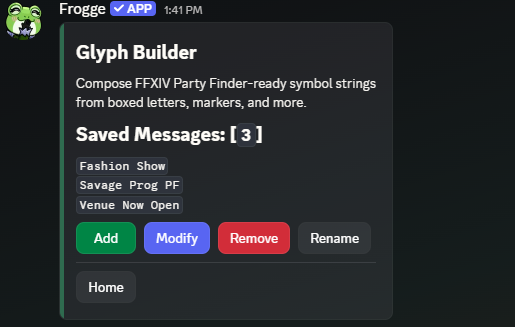
Glyph Builder composes FFXIV Party Finder-ready symbol strings, boxed letters, markers, and more,
that you save, edit, and reuse. Admin-only, reached from /admin menu's top-level dashboard;
there's no public command.
Quick Start
- Run /admin menu → → , name it: this drops you straight into the builder.
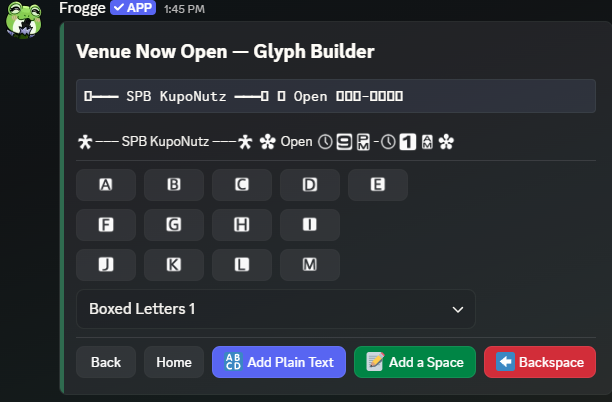
- Pick a Symbol Set from the dropdown, then tap symbols to add them, or use / / to mix in freeform text.
- The raw string (paste this into FFXIV's Party Finder) and a Discord-rendered preview both update live as you build.
 →
→ 
Full reference
Building a message
There's no separate detail screen: both and go straight into the same interactive builder, since a message's only real content is its symbol sequence.
11 Symbol Sets are available from the dropdown: Boxed Letters 1, Boxed Letters 2, Boxed
Numbers, Boxed Roman Numerals, Markers, Mouse Symbols, Number Symbols, Octagonal Numerals, Regular
Symbols, Unicode Box Drawing, and Unique Glyphs, 127 bundled symbols total, fixed and not
admin-editable. Ten of the eleven sets use FFXIV's own special-use character codes, so they only
look right pasted inside FFXIV itself; Discord shows a bracketed placeholder name (e.g.
[High Quality]) for one of these unless a matching custom emoji has been uploaded for it.
Unicode Box Drawing is the one exception: genuine Unicode that renders identically everywhere,
Discord included.
opens a modal for freeform characters; and do exactly what they say. A message is capped at 200 characters, matching FFXIV's own Party Finder description field, measured by the actual rendered string rather than how many taps it took to build it.
Managing saved messages
/ / / , capped at 80 messages per venue. Rename is available even though nothing else about a saved message can change without opening the builder and editing its symbol sequence directly.
Using a message
Glyph Builder only builds and stores the string; it doesn't post anywhere on its own. Copy the raw string shown at the top of the builder screen and paste it wherever you need it, FFXIV's Party Finder or otherwise.
Related
- Standalone: doesn't connect to any other module.